Free Door Hanger & Yard Sign Tracking App
Create routes, assign workers, watch their GPS path, and check off every home and sign with GPS and photos. Track their pay too. All in one place.
You bought the materials. They're earning nothing.
Yard signs in the garage. Boxes of door hangers in the back office. Sitting there while your competitors are on every corner and every doorstep. FlyerFly fixes that in a few taps.
Get them out in the market today.
CRMs that connect today
- FieldRoutes (Pest control and lawn)
- Flyra (Window cleaning and exteriors)
- Housecall Pro (Home services)
- GoHighLevel (Leads and marketing)
- Workiz (Home services)
- JobNimbus (Roofing)
- GorillaDesk (Pest control and lawn)
- Sweep&Go (Pet waste removal)
- Service Fusion (Home services)
- Kickserv (Home services)
- Zuper (Home services)
- HubSpot (Sales)
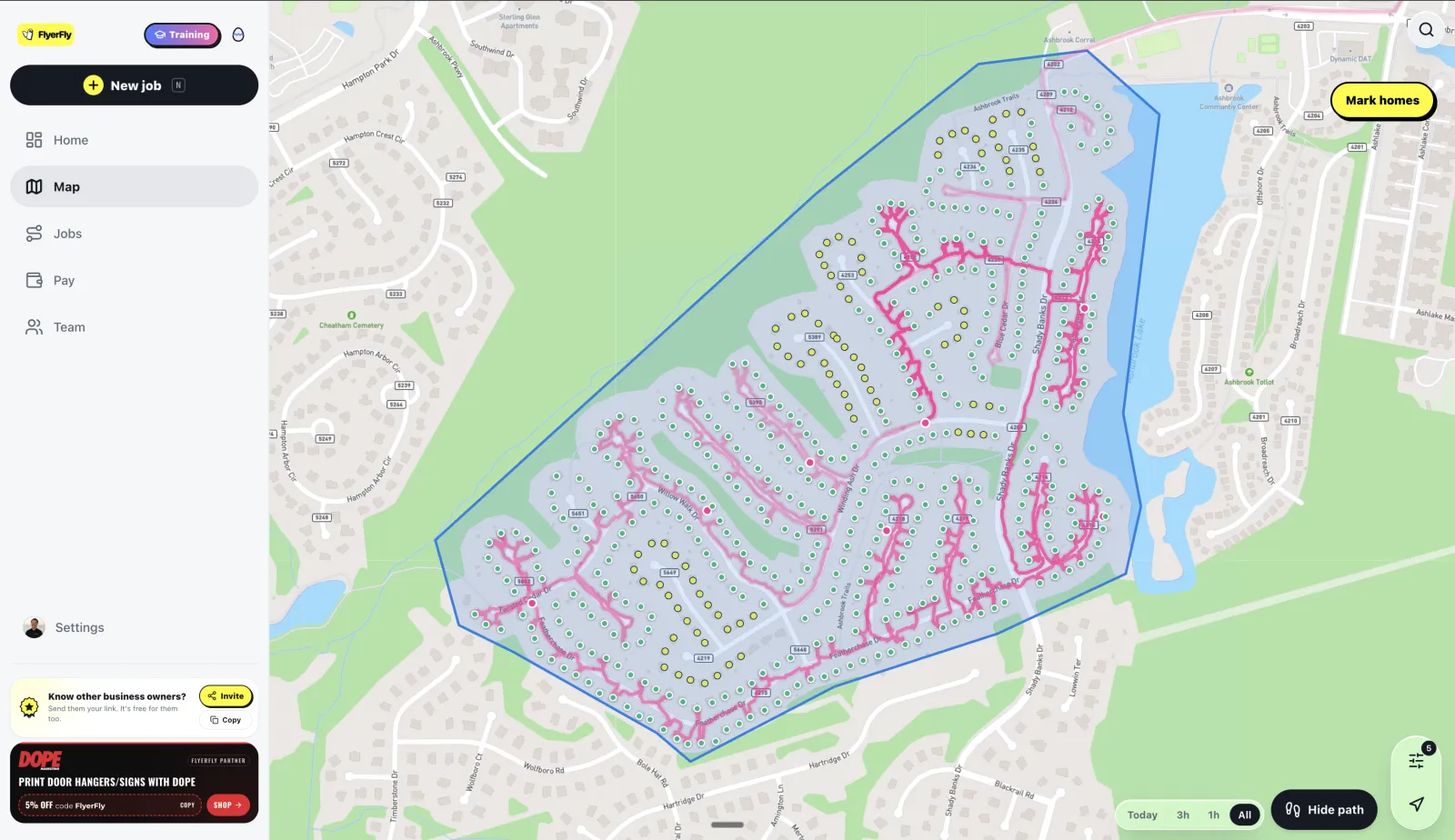
Like Strava, but for door hangers
Every pink line is a street your crew walked. Every dot is a home in the area, checked off as they go, so you can see what got covered and what got skipped.
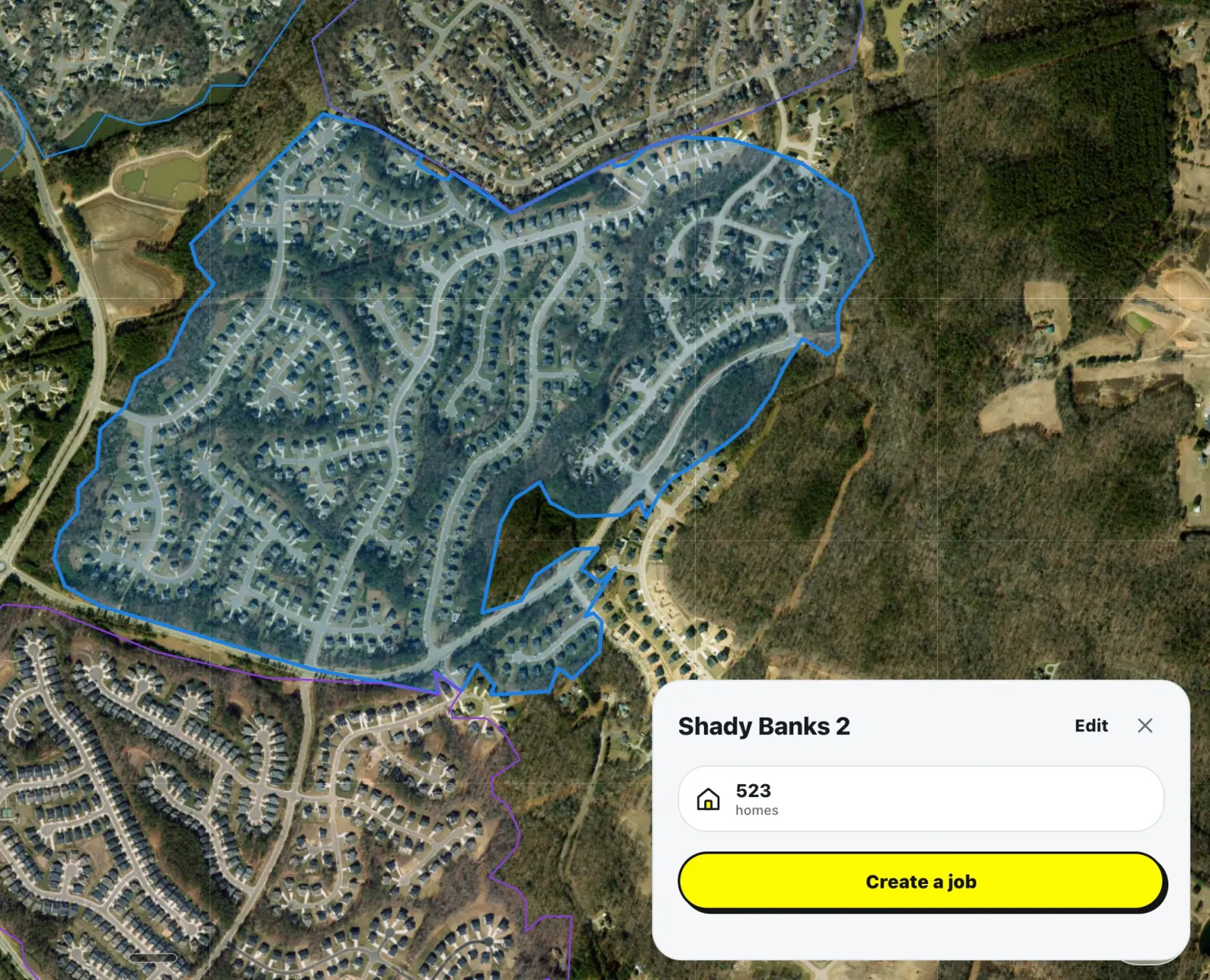
Circle any neighborhood
Draw the area you want covered right on the map, on satellite or street view, and FlyerFly counts the homes inside it. Then tap Create a job.
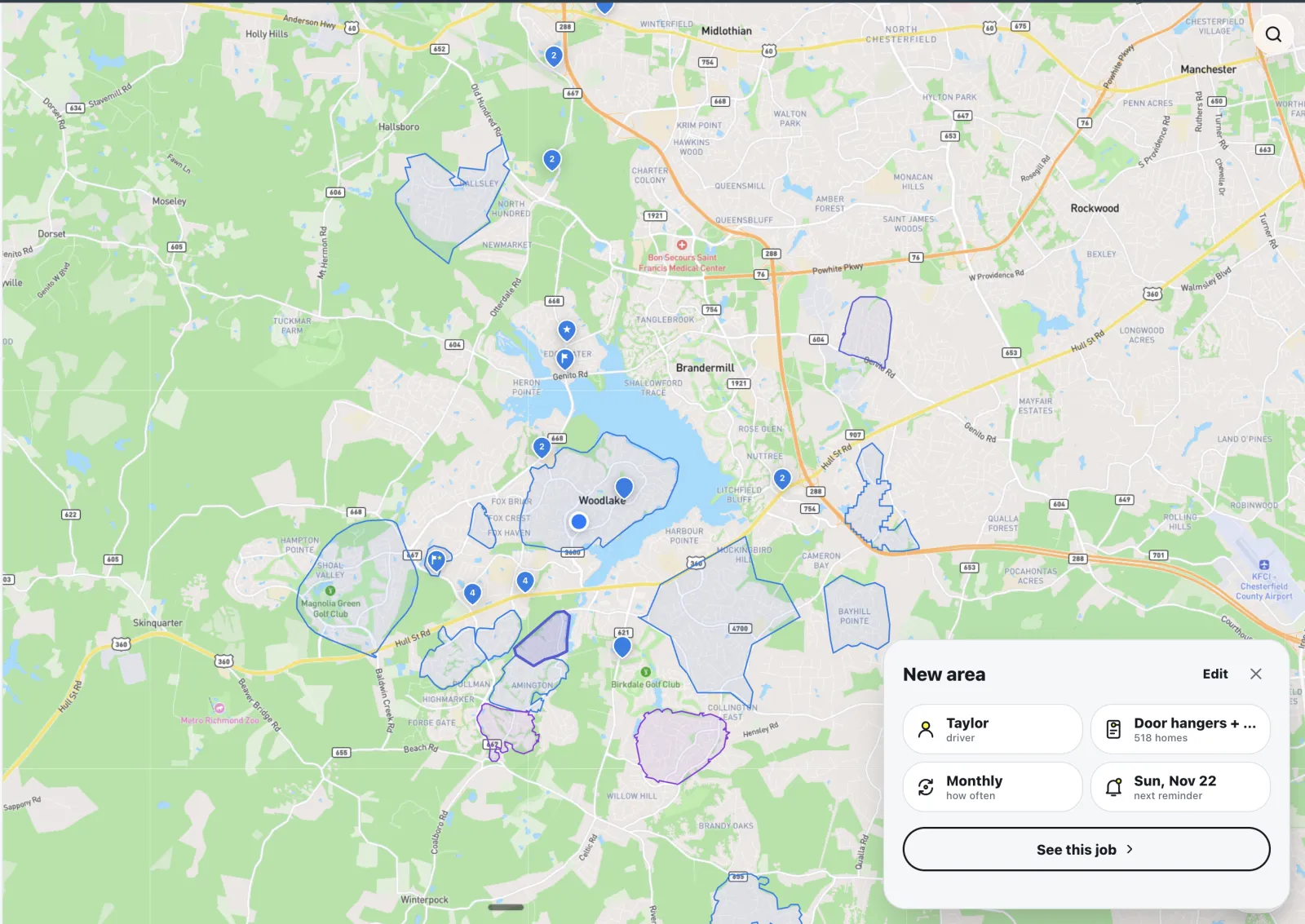
Assign it and set it to repeat
Pick who runs each area, how often it goes out again, and when you get a reminder. Every area you draw stays on your map.
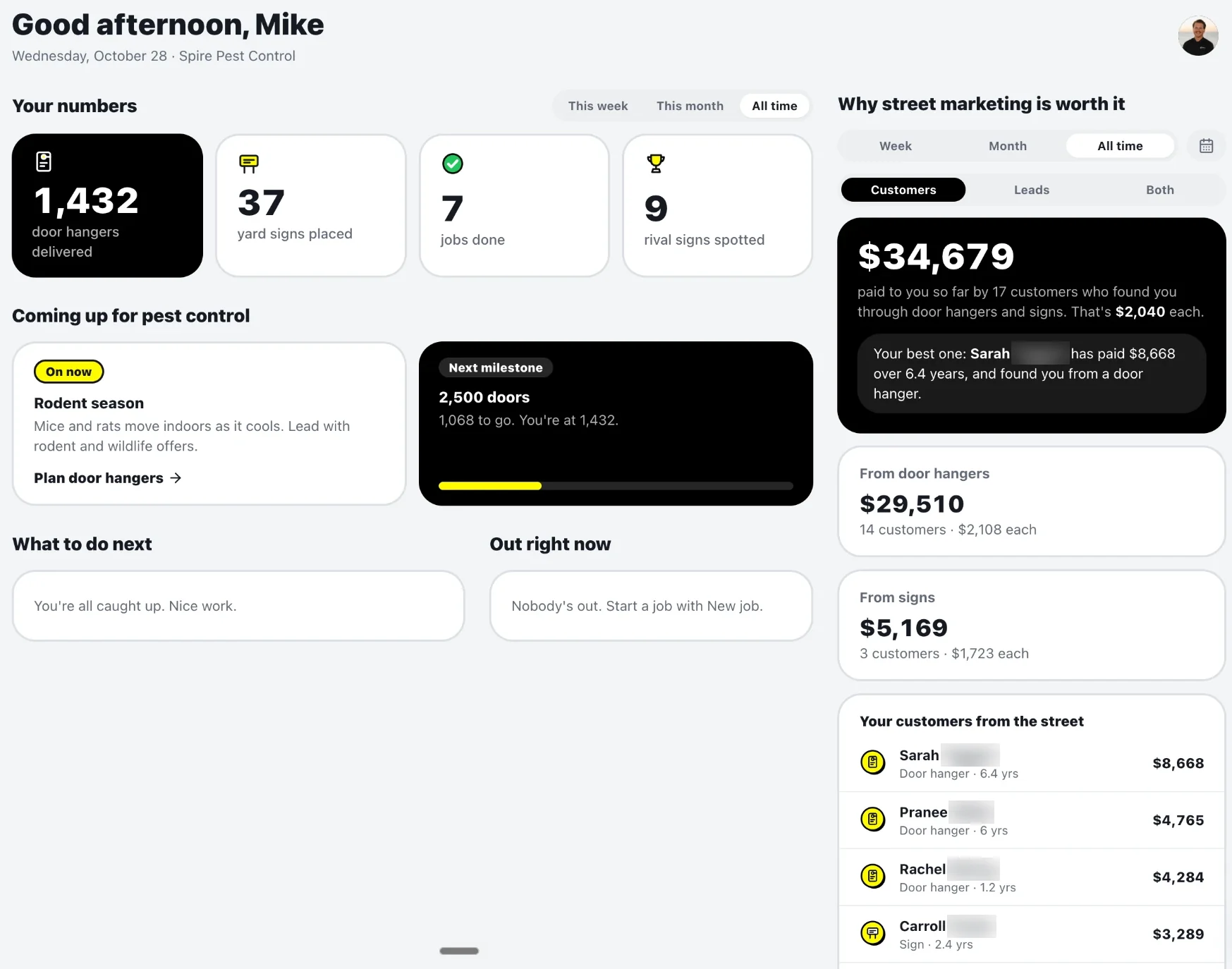
See what your door hangers and signs paid you
Your home screen adds up every customer who found you from a door hanger or sign and what they've paid you, with hangers and signs side by side.
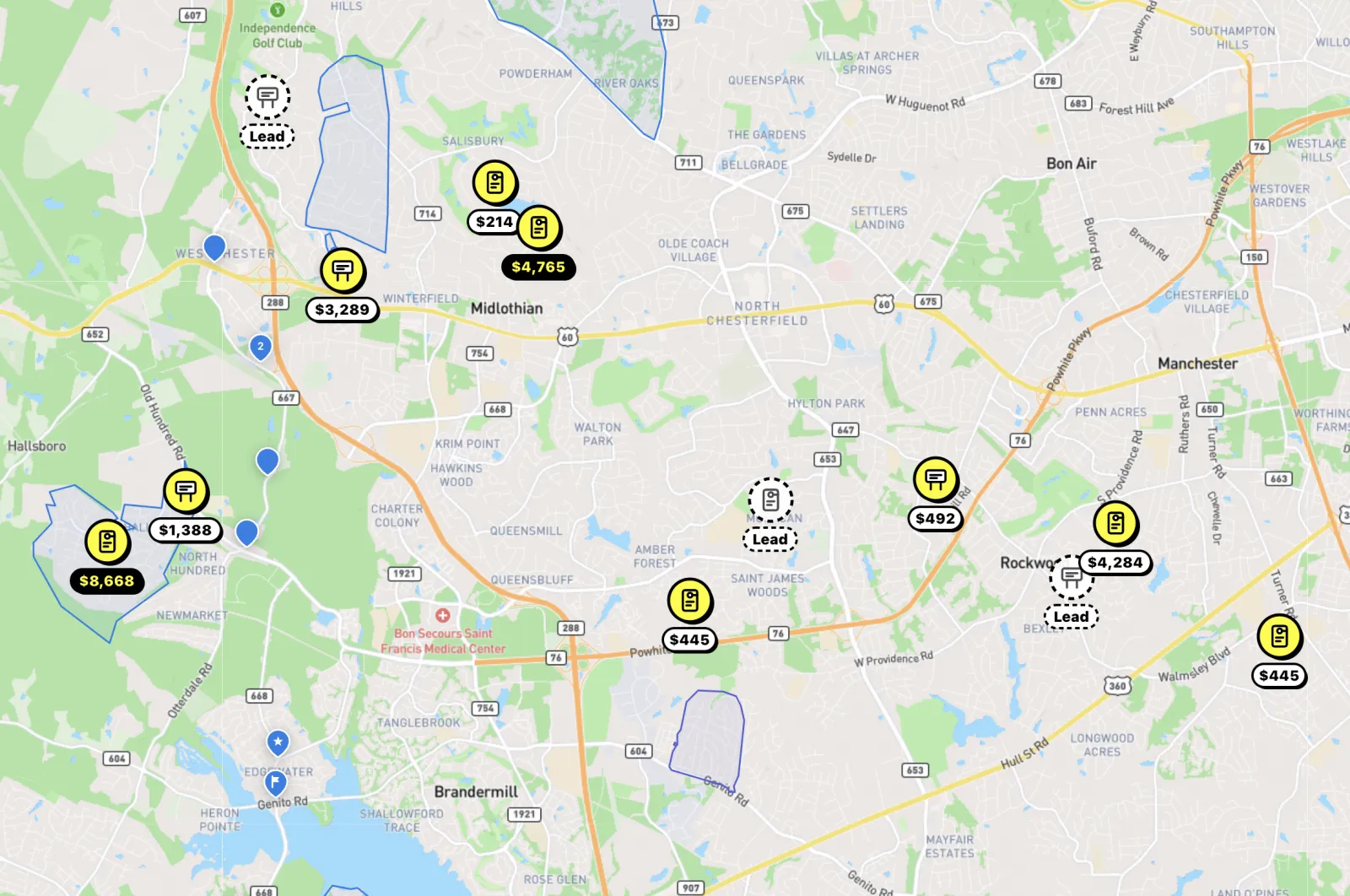
See what every hanger and sign earned
Connect your CRM and see each customer your door hangers and signs brought in, and what they've paid you.
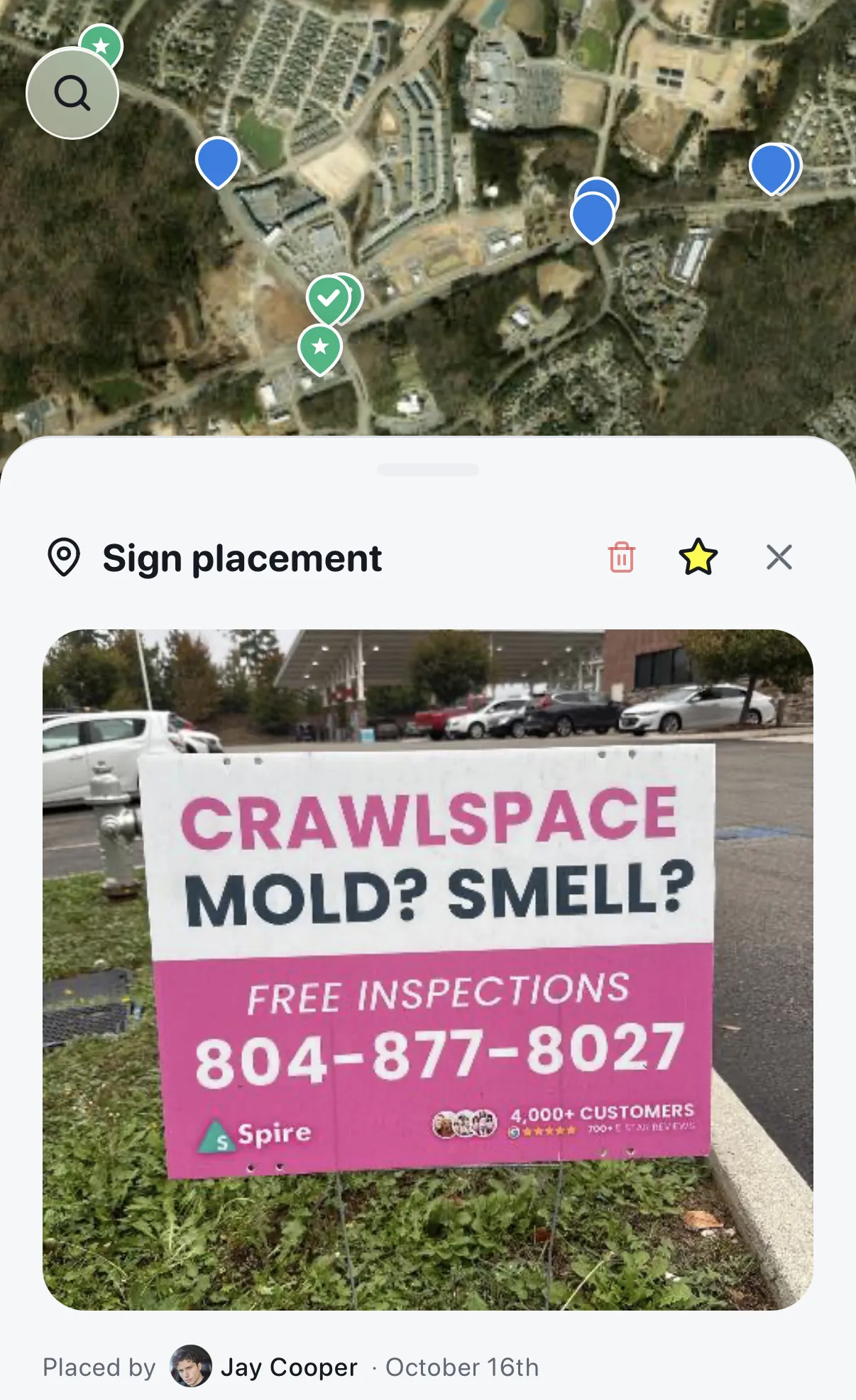
Star your best sign spots, with a photo of every sign
Every sign comes back with a photo, the date and who put it out. Star the spots that work and send the next crew straight back to them.
01
Create the job
Circle the neighborhood, pick signs or door hangers, set your pickup.
drawArea
02
Assign or share the link
Send it to your own crew member, or drop the recruit link on social media to bring one on.
doorHanger
03
See it happen
A start photo, proof photos as often as you set and a GPS trail of where your crew went.
owner
- Assign jobs to your own crew in seconds
- Share a recruit link on social to bring on new crew members
- Every home checked off by GPS, no photo at every door
- Photo + GPS proof for every sign
- Recurring routes — hit the same streets weekly
- Manage your whole team from one dashboard
Door hangers and signs, they don't work unless you go put them out and make them work for you. And that's exactly why we created FlyerFly for you. It's a free platform to create routes, assign your crew and track where your door hangers and signs go up.
Check this out. Let's say you just ordered 5,000 door hangers. After you sign up, you just select the neighborhoods you want to target, create your routes and assign them to yourself or to your crew.
But here's where it gets interesting. You know those apps that track when you run, like Strava or Map My Walk? It's like that, but for your crew. You can see exactly where your crew goes, which streets they covered, and even track them as they walk up to each door. You can also decide if you want them to take photos or not.
And that's not even the best part. If you pay your crew per door hanger, you need a good way to track your crew, and they want to see how much they're earning as well. This makes it easy for you both.
Now let's talk about signs. Rather than guessing where the best sign spots are, what if there was a tool that just told you? FlyerFly will mark some of the best sign spots in your area, so you and your team, you don't have to guess anymore.
Now you might say, “Well Casey, you know, this all sounds great and all, but now that I have my door hangers and signs, who's going to put these out for me?” And I've got you covered again. Once you create an account, you go and you get a free recruiting link. Just copy and paste it on Facebook or in local groups, and people apply just to be on your team. Assign them routes and you can track the work right inside the app.
If you plan on growing your business with door hangers or signs this year, FlyerFly is free. Create an account and get started below today.
How can I track someone putting out door hangers?
Draw the area on FlyerFly's map and assign it to them as a route. They open it on their phone, take a start photo and walk. Each home is checked off by GPS as they reach it, you watch their path live on your map, and proof photos come in as often as you set.
Is there a free door hanger tracking app?
Yes. FlyerFly is a free door hanger and yard sign tracking app. No credit card, no subscription and no paid tier.
How can I verify my contractors delivered flyers?
Look at three things together: the GPS path they walked, the homes checked off along it, and the proof photos from the route. FlyerFly records all three. GPS shows they reached each house; it is not a photo of every hanger, so the photos and a few spot checks matter too.
Can I assign door hanger routes to workers?
Yes. Draw the area, pick the worker or contractor and send it. They see the route on their phone. Invite your team by QR code, or share a recruit link to bring someone new on.
Can I save yard sign locations?
Yes. Pin the spots that work and they stay on your map, so the next person gets a route to proven spots instead of a guess. Each placed sign also comes back with a GPS pin and photo.
Can I repeat the same distribution route?
Yes. Set a route to repeat weekly, every 2 weeks, every 3 weeks, monthly, every 2 months or quarterly, and FlyerFly reminds you when it's time to go again.
Does FlyerFly use GPS?
Yes. Every yard sign gets a GPS pin, door hanger homes are checked off by GPS as the worker reaches them, and your map shows where your crew is and the path they walked.
Can I use FlyerFly for my pest control, roofing, real estate or landscaping business?
Yes. FlyerFly is built for local businesses that put out door hangers and yard signs: pest control, roofing, real estate, lawn care and landscaping, pressure washing, HVAC, cleaning and more.
Do I need to have a crew already?
Nope. Assign a crew member you already have, or share your recruit link on Facebook, Instagram, or text and bring one on in minutes.
Do I need to supply my own signs?
Yes — you bring your own yard signs, bandit signs, and door hangers, and your own crew or someone you recruit puts them out. FlyerFly doesn't print them.
How do I know it actually happened?
Every sign gets a GPS pin, photo and time. On door hanger routes, each home is checked off by GPS as your crew walks up to it, your map draws the path they walked, and proof photos come in as often as you set.
Do my workers have to take a photo at every door?
No. FlyerFly checks off each home by GPS as they walk up to it, even with the phone in their pocket. They take a start photo, then proof photos as often as you set, so the route goes as fast as they can walk it.
Does FlyerFly provide crew?
No. You send routes to your own crew, or share a recruit link on Facebook, Instagram or text and people sign up to join your crew.
Can I see where my crew is right now?
Yes. While your crew works, your map shows where they are and draws the path they walked, like Strava for door hangers. Every sign also comes back with a GPS pin, a photo and the time.
Does FlyerFly pay my crew?
No. You set per-sign, per-hanger or hourly rates and FlyerFly shows what each person earned. You pay your crew yourself.
Is FlyerFly free?
Yes. FlyerFly is a free door hanger and yard sign tracking app. No credit card, no subscription, nothing to cancel.
Is FlyerFly the same as flyerfly.app?
No. FlyerFly, the door hanger and yard sign app, lives at flyerfly.io. flyerfly.app is an unrelated company. FlyerFly is made by Reviin LLC in Richmond, Virginia.
Is there a FlyerFly app?
The business side runs on the web at flyerfly.io. The phone app is on Google Play now, and on iPhone through TestFlight while the App Store version is pending.